
GeM Portal Login for Sellers and Government Buyers
GeM portal login needs three things: your user ID, your password and a one time password sent to the mobile number or email registered on the account. That is the whole mechanism. Almost every failed login on gem.gov.in comes down to a user ID that people confuse with an email address, an OTP going to a number nobody uses any more, or a profile that was never completed. This guide covers the login steps for sellers and buyers, the signup process if you do not have an account yet, and a fix for each error message you are likely to meet.
Use the buttons below to reach the official GeM portal login page. Everything on this page is explanation, not a login screen. We cannot access, open or recover anyone’s account.
Never enter your GeM password or OTP on this site or any site other than gem.gov.in. gemportal.com.in/ is a private guide with no government connection. We do not host a login form, we do not recover accounts, and no genuine GeM official will ever ask you for a password or an OTP over phone, email or WhatsApp.
GeM portal login for sellers, step by step
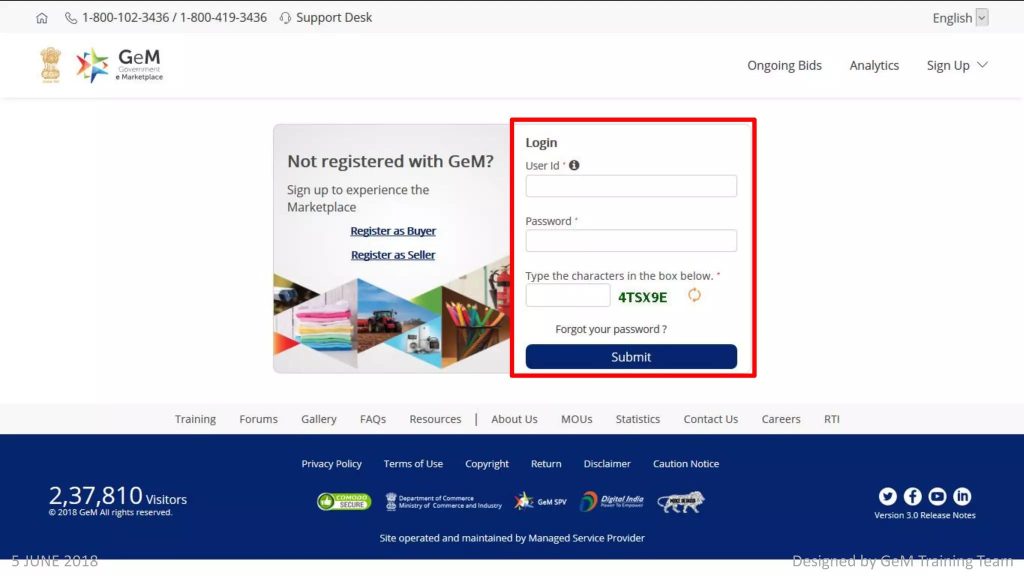
- Open gem.gov.in in a current browser. Check the address bar reads gem.gov.in before typing anything.
- Click Login at the top right of the page.
- Enter your user ID. This is the ID created at registration. It is not your email address and it is case sensitive.
- Enter your password and continue.
- Enter the OTP sent to the registered mobile number or email.
- If the account carries more than one role, choose Seller.
- The dashboard opens with catalogue, orders, bids, payments and profile sections.
What you should check on first login
- Profile completion percentage. Bid participation stays locked below the required level.
- Expiry dates on GST, ITR and any certificates attached to the account.
- Caution money status if you intend to bid.
- Bank details, because payment goes wherever the account says, not wherever you assume.
GeM portal login for buyers and what each role can do
Buyer login follows the same three steps. What changes is what you see afterwards, because a government buyer account is split into roles assigned by the department.
| Role | What that login can do |
|---|---|
| Primary user | Owns the organisation account, creates and removes secondary users |
| Buyer | Searches the catalogue, creates demand, places orders and publishes bids |
| Consignee | Receives goods, inspects them and generates the acceptance certificate |
| DDO or paying authority | Processes the invoice and releases payment |
If a menu you expect is missing
Nine times out of ten the role has not been assigned, or the officer is logged in under the wrong role. Ask the primary user in your office to check the role mapping before raising a ticket.
Signup guide if you do not have an account
Signup and login are different doors. If you have never registered, the login page will keep rejecting you no matter what you type.
Signing up as a seller
- Open gem.gov.in and click Sign Up, then Seller.
- Accept the terms of use.
- Enter the Aadhaar of the proprietor, partner or director who will control the account, and verify the OTP on the linked mobile. Personal PAN can be used where Aadhaar is unavailable.
- Enter organisation type, legal name exactly as on the PAN, date of commencement and address.
- Create a user ID and password. Store the user ID somewhere permanent.
- Log in and complete the profile with PAN, GST, bank details and any MSME or startup certificate.
The two decisions that cause the most rework
Organisation type
Proprietorship, partnership, LLP, company and trust each demand different proof afterwards. Choosing wrongly means starting again with a fresh account, and your PAN is already used, which turns a five minute mistake into a support ticket.
Who the primary user is
Register in the name of someone who will still be in the business in three years. Accounts created in a departing employee’s name are the single most common reason businesses lose access.
Signing up as a buyer
Choose Buyer, verify with Aadhaar, use your official email address rather than a personal one, and select your exact office from the government hierarchy. Verification by the competent authority applies in many organisations. The full walkthrough is on our GeM registration page.
GeM portal login errors and how to fix them
Work through these in order. Most people solve the problem before reaching the support stage.
OTP not received
Check the number, not your habits
The OTP goes to the number registered on the account, which is frequently an old SIM. Confirm which number is actually on file. Check that DND or a call blocking app is not filtering service messages, and look in the email spam folder if OTP delivery is set to email.
Do not spam the resend button
Wait the full timer before requesting again. Three rapid requests often cancel each other and you end up with none.
When the registered mobile number is gone for good
You cannot change the number without logging in and you cannot log in without the number. The only route is a support ticket with identity proof. Raise it early in the week and keep the ticket number.
Invalid user ID or password
The user ID is case sensitive and is not your email. Stop after two failed attempts and use the forgot password link instead, because repeated failures lock the account. Check that caps lock is off and that your browser is not autofilling an old password.
User disabled
Four common causes: too many failed attempts, a profile that was never completed, the primary user leaving without a handover, or a compliance flag. The first two you can resolve yourself. The others need a ticket with documents. Details on our user disabled page.
Account locked temporarily
Wait out the lock period rather than trying again every minute, which extends it. Use the time to confirm your user ID from your registration email.
Session expired while working
The portal signs you out after a short idle period. Draft long bid responses in a separate document and paste them in. Save at every stage rather than at the end.
Page not loading, buttons not responding
Clear cache and cookies, disable browser extensions, and try a private window. Older machines in government offices sometimes run browser versions the portal no longer supports. If one browser fails, test a second before assuming the portal is down.
Digital signature or DSC not detected
Where a signature is required, check that the token driver is installed, the certificate is not expired, and the browser is allowed to access the token. A DSC issued to a former director will not work for a current one.
Profile incomplete message at bid time
This is not a login fault. A missing document or an expired certificate hides bid options. Open the profile section and clear every pending item.
Recovering a lost user ID or password
Forgot user ID
Use the forgot user ID link and supply the registered email or mobile. The ID is sent to whichever is on file. Search your inbox for the original registration email first, since it is usually still there.
Forgot password
Use the reset link, verify with the OTP, and set a new password. Do not reuse the old one. Update it anywhere your team stored it, because a stale saved password causes the next lockout.
When both are lost and contact details are outdated
This needs a support ticket with proof of identity and proof that the business is yours. Prepare PAN, GST certificate and an authorisation letter before you open the ticket. Our recovery guide lists what to attach.
Keeping your GeM portal login safe
- Never share a password or OTP with a consultant, an agent or a caller claiming to be from GeM.
- Type gem.gov.in yourself rather than clicking links in messages. Lookalike domains exist and they are convincing.
- Use separate secondary users for staff instead of sharing the primary login.
- Remove access immediately when someone leaves the organisation.
- Keep the registered mobile and email under the business’s control, not an individual’s personal account.
If you are unsure whether a site or a caller is genuine, read how to verify the real GeM portal.
Where to get official help
For account access, order and payment issues, use the helpdesk contacts published on the contact page at gem.gov.in. We do not reprint phone numbers here because they change and a wrong number sends people somewhere useless. Raise a ticket as well as calling, since the ticket number is what lets you escalate later. If a ticket stalls for weeks, the next steps are the public grievance route and then the nodal officer for your state or ministry, which we explain on our grievance page.
GeM portal login from a phone
The portal works in a mobile browser, though the seller dashboard and the bid screens were designed for a larger display. For checking an order status or reading a bid notice, a phone is fine. For preparing a bid response, uploading documents or building a catalogue, use a computer. Mobile browsers also handle session timeouts badly, and losing a half completed bid form on a phone is a particular kind of misery. Download apps only from links published on the official portal, since fake GeM apps that collect user IDs and passwords have circulated before.
Managing secondary user logins on GeM
Creating a secondary user
The primary user creates secondary users from inside the account and assigns rights to each. Give people only the rights their job needs. A staff member who prepares catalogues does not need payment or profile rights.
Removing access when someone leaves
Remove the login the same day, and change the primary password if that person ever had it. On the buyer side, the same rule applies when an officer is transferred. Shared logins are convenient right up to the day they are not.
GeM portal login troubleshooting table
| What you see | Most likely cause | First thing to try |
|---|---|---|
| Invalid credentials | Email used instead of user ID | Find the user ID in your registration email |
| No OTP | Old registered mobile number | Confirm which number is on the account |
| User disabled | Repeated failed attempts | Use password reset, then raise a ticket if it persists |
| Logged out mid task | Idle session timeout | Draft offline and paste, save at each stage |
| Bid option missing | Incomplete profile or expired document | Clear every pending item in the profile |
| Blank or broken page | Browser cache or extension conflict | Private window in a different browser |
What to collect before you contact support
A ticket with details attached moves faster than one that says login not working. Have these ready.
- Your user ID, or the registered email and mobile if you have lost it.
- The exact error message, copied word for word, with a screenshot.
- The date and approximate time of the failed attempts.
- The browser and device you were using.
- PAN and GST certificate of the business, for identity checks.
- An authorisation letter on your letterhead if you are not the primary user.
GeM portal login problems specific to government offices
The officer who registered has been transferred
The account stays with the office, not the person, but access does not transfer by itself. The department has to reassign the primary user role. Start that process before the officer leaves rather than after, because doing it afterwards requires far more paperwork.
DDO or paying authority change
When the paying officer changes, pending invoices can sit unattended for weeks while nobody notices the role is vacant. Sellers chasing payment often find this is the real reason. If you are a buyer, check role mapping whenever staff move.
Official email address no longer active
Government email addresses are deactivated when officers move. Because OTPs and reset links go there, an inactive address locks the account as effectively as a lost password. Update contact details as part of the handover checklist.
A five minute check before you decide the portal is broken
Most people who report that GeM portal login is not working are hitting one of six things, and the check takes five minutes. Confirm the user ID from your registration email rather than typing what you remember. Confirm which mobile number is registered, not which one you carry. Try a private browser window with extensions off. Try a second browser. Check whether the problem happens on one account or on every account in your office, because an office wide failure usually means a network or proxy rule rather than a portal fault. Finally, check the time of day, since heavy load near bid closing hours slows everything and people mistake a slow page for a failed login.
If all six checks pass and you still cannot get in, the problem is on the account itself and a ticket is the right next step. Collect the details listed above before you raise it.
Why GeM portal login matters more than it looks
A login is usually a formality. Here it is not, because the account is tied to your PAN and your business identity. Losing access does not mean creating a new account, since the PAN is already used. It means a support process with documents and waiting. That is the practical reason to treat the registered mobile number, the registered email and the primary user choice as business decisions rather than form fields. Keep them under the control of the business, review them once a year, and update them during any handover.
Questions people ask about GeM portal login
What is the GeM portal login link?
The Login button on gem.gov.in. There is no separate login domain, and any other site offering a GeM login form should be treated as unsafe.
Is the user ID the same as my email?
No. The user ID is created by you at registration and is case sensitive. This single misunderstanding causes most failed logins.
Can I complete GeM portal login without an OTP?
No. The one time password is part of the process and cannot be skipped.
How do I change the mobile number on my GeM account?
From inside the account, in the profile section, after logging in. If you cannot log in because the number is dead, you need a support ticket. Steps are on our mobile number change page.
Do I need a GeM portal login to see tenders?
No. Live bids can be viewed without an account. You need to log in to participate.
Is there an official GeM portal login app?
Check the official portal for current app availability, and download only from links published there. Fake GeM apps that harvest credentials do exist.
Why does my seller dashboard show no bid option?
Usually an incomplete profile, unpaid caution money or an expired document, rather than a login problem.