
GeM Portal Registration: Step by Step Process for Sellers
GeM portal registration is free, it is done by you on gem.gov.in, and for most businesses it takes about thirty minutes once the documents are in front of you. Nobody has to be paid for it. This guide walks through the full process for sellers and for government buyers, lists the documents by business type, explains what registration costs later on, and covers the verification errors that stop people halfway.
Read the GeM portal registration sections in order the first time. The mistakes that cause the most rework happen in the first three screens, before anyone has even uploaded a document.
Important. This page is a guide, not a registration service. gemportal.com.in/ is private and has no government connection. We will never ask for your PAN, Aadhaar, GST certificate, bank details or any fee. Complete your GeM portal registration yourself at gem.gov.in.
Who needs to register and as what
There are two account types and picking the wrong one wastes a day.
Seller account
For any business that wants to supply goods or services to government. Manufacturers, OEMs, authorised dealers, resellers, traders, service companies and individual professionals all fall here.
Buyer account
For government officers purchasing on behalf of an office. Central and state departments, PSUs, autonomous bodies, local bodies and government funded institutions register on this side, and the account belongs to the organisation rather than the person.
A note for consultants and agents
There is no agent account type on GeM. A consultant can help you fill forms, but the account is created in your business name with your Aadhaar or PAN, and you should hold the credentials. If someone offers to register you under their own login, walk away.
Documents required for GeM portal registration
Keep these ready before you open the signup page. Scans should be clear and within the size limits shown on each upload screen.
For every seller
- Aadhaar number of the proprietor, partner or director who will be the primary user, with the mobile number linked to that Aadhaar active and in hand. Personal PAN can be used where Aadhaar is not available.
- Business PAN. For a proprietorship the proprietor’s PAN serves as the business PAN.
- An email address that you control and will keep for years.
- Date of incorporation or commencement of business.
- Bank account number and IFSC in the business name.
- Registered office address with pin code.
Additional papers by business type
| Type of business | What GeM asks for in addition |
|---|---|
| Proprietorship | Proprietor PAN and Aadhaar, business proof such as GST or Udyam certificate |
| Partnership firm | Firm PAN, partnership deed, details of the authorised partner |
| LLP | LLP PAN, LLPIN, details of the designated partner |
| Private or public limited company | Company PAN, CIN, certificate of incorporation, authorisation for the signing director |
| Trust or society | Registration certificate and PAN of the entity, authorisation of the signatory |
Papers you will need soon after, even if not on day one
- GST registration certificate. Not always demanded at signup, but required for higher value orders and most bids.
- Income tax return details for the last three years, checked when you bid above certain values.
- Udyam registration if you are an MSME, or DPIIT recognition if you are a startup. These unlock purchase preference and relaxations, and they only work if attached to the account.
- OEM authorisation letters if you resell another manufacturer’s brand.
The full checklist with format rules sits on our documents required page.
GeM portal registration for sellers, step by step
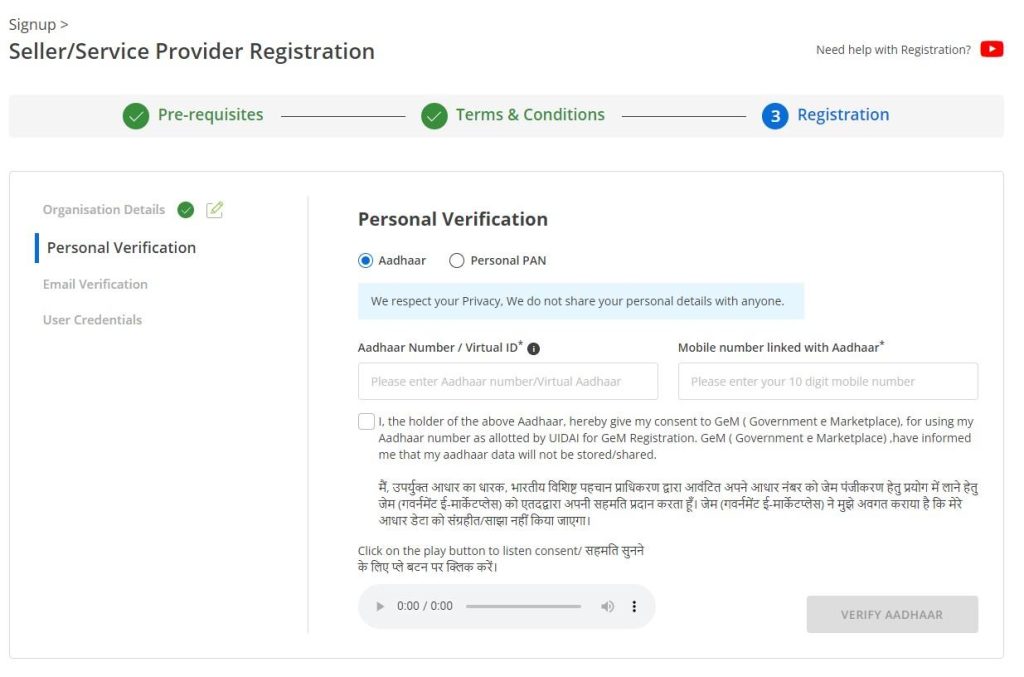
Step 1: Open the official signup page
Go to gem.gov.in and click Sign Up, then choose Seller. Check the address bar before you type anything. The only genuine domain ends in gem.gov.in.
Step 2: Accept the terms of use
Read the section on your responsibilities as a seller. It defines what happens when you fail to deliver, which matters later when a buyer raises an incident.
Step 3: Verify identity
Enter the Aadhaar of the person who will control the account, and verify the OTP sent to the mobile number linked with that Aadhaar. If Aadhaar is not available, use personal PAN and follow the alternate verification.
Choose the primary user carefully
The primary user is the account owner in practice. Register in the name of a proprietor, partner or director who will still be with the business in three years. Companies that register in an employee’s name regret it when the employee leaves, because transferring the primary user is slower than creating the account was.
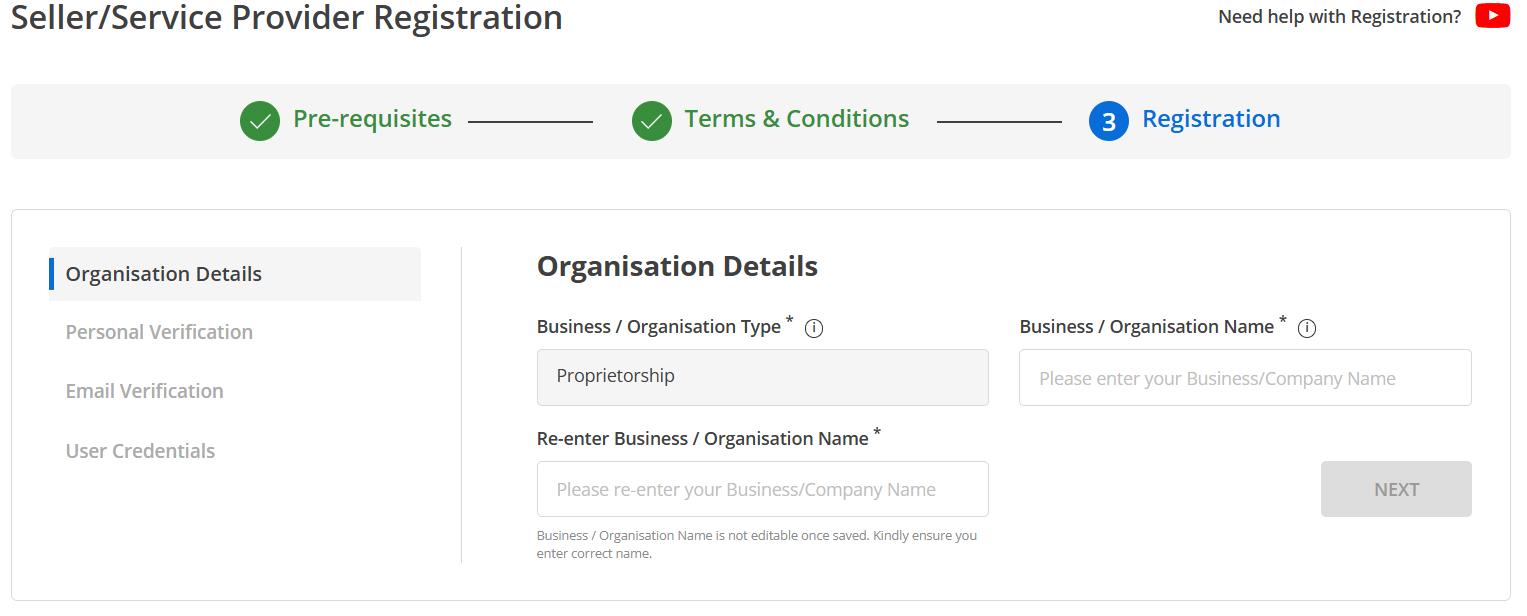
Step 4: Enter organisation details
Organisation type, legal name exactly as it appears on the PAN, date of commencement, and address. The legal name must match the PAN database character for character. A missing suffix such as Pvt Ltd is enough to fail verification.
Step 5: Create user ID and password
Pick a user ID you will remember and store it somewhere permanent. It is not your email address. Use a strong password and do not share it with a consultant.
Step 6: Complete the profile
Log in and fill every section: PAN validation, GST, bank account, office address, MSME or startup certificate, and category of business. The profile completion percentage on the dashboard is the number that matters. Bidding options stay hidden until it is high enough.
Step 7: Build the catalogue
Add your products or services under the right category, matching every parameter the category demands. This is where most new sellers spend their first week, and it decides whether buyers ever find you.
GeM portal registration for buyers, step by step
Buyer registration follows a similar path with departmental checks added.
- Choose Buyer at signup and verify with Aadhaar and the linked mobile number.
- Enter your official email address. Personal email addresses are not accepted for most buyer categories.
- Select your organisation from the government hierarchy, ministry, department, office and location. Pick the exact office, since orders and payments follow that mapping.
- Wait for verification by the competent authority in your organisation where it applies.
- After login, get roles assigned. A primary user creates secondary users, the DDO handles payment, and the consignee issues the acceptance certificate.
Officers who cannot see a purchase option after login almost always have a role problem rather than a technical one. Our buyer registration page explains the role structure.
What GeM portal registration costs
Registration itself is free. These are the real costs that come later, and being clear about them is the point of this section.
| Item | Who pays | Nature of the charge |
|---|---|---|
| Registration | Nobody | Free on the official portal |
| Caution money | Sellers who bid | Refundable deposit in slabs, held by the portal |
| Vendor assessment | Sellers in categories that require it | One time assessment fee, valid for a fixed period |
| Transaction charges | Sellers on larger contracts | Percentage of order value above a threshold, plus GST |
| Consultant fee | Optional, paid to a private firm | Not a government charge and not required |
Current amounts are published on the portal and change from time to time. Our GeM registration fees page keeps track of what is a fee, what is a deposit and what is neither.
GeM portal registration errors and how to clear them
PAN verification failed
Nearly always a name mismatch. The name in your GeM form must match the income tax database, including initials, spacing and suffixes. Check your PAN details on the income tax site, copy the name exactly, and retry. A PAN that is inactive or linked to a closed entity will also fail.
ITR verification failed
Either returns were not filed for the years being checked, or the assessment year selected is wrong, or the filing is too recent to be reflected. Check the acknowledgement numbers and try the previous year. Full guidance is on our PAN and ITR verification page.
Aadhaar OTP not received
The OTP goes to the number linked with Aadhaar, which is often an old number people no longer use. Update it at an Aadhaar centre, or register using PAN instead.
PAN already exists
Someone has already created an account with that PAN. If it was a former employee or a consultant, recover it through the primary user process. Do not create a second account.
GST mismatch
The legal name on the GST certificate and the PAN must agree. If your GST was registered with a trade name, use the legal name field.
Vendor assessment, and whether you need it
Vendor assessment is a third party check of a seller’s capability, carried out for certain categories and particularly for manufacturers and OEMs. The assessor looks at your premises, machinery, quality process and records. It is chargeable, it has a validity period, and some sellers are exempt depending on category and existing certifications. If your category needs it and you skip it, your listings will be restricted. We cover the process, the cost and the exemptions on the vendor assessment page.
Do you need a consultant?
The honest answer is no for the registration itself. A form that takes half an hour is not worth thousands of rupees. Where a consultant can genuinely help is catalogue creation in a difficult category, or preparing bid documents for a large tender. Those are skills. Registration is not.
If you do hire someone, insist on three things. You create the password. You receive the OTPs. You get the user ID in writing. A consultant who refuses any of those is taking control of your business account.
After GeM portal registration, what happens next
First week
Finish the profile to full completion, add MSME or startup certificates, pay caution money if you plan to bid, and build your first catalogue entries carefully rather than quickly.
First month
Watch live bids in your category daily to learn how buyers word requirements. Study three bid documents fully before you submit one. Read our bidding guide before your first submission.
Ongoing
Keep GST, ITR and certificates current, because an expired document quietly blocks bid participation. Keep prices updated. Respond to buyer queries fast, since response time affects how often you are chosen in direct purchase.
GeM portal registration for service providers
Service registration follows the same signup path, and the difference appears afterwards. Services sit in their own category tree with rates defined per unit of service rather than per item, so a manpower supplier quotes per person per month while a transport supplier quotes per vehicle per day. Before registering, find your service category on the portal and read how the unit is defined, because your entire pricing depends on it. Manpower and outsourcing categories also ask for compliance documents such as EPF and ESI registration, labour licence where applicable, and past experience proof for larger tenders. Gather them at the start rather than at bid time.
How long each stage takes in practice
| Stage | Usual time | What slows it down |
|---|---|---|
| Account creation | Same day | Aadhaar OTP going to an old number |
| Profile completion | One to three days | PAN or GST name mismatch, missing bank proof |
| Catalogue approval | Days to weeks | Parameters that do not match the category |
| Vendor assessment | Weeks | Scheduling the assessor visit and preparing records |
| First order | Unpredictable | Category demand, price position and seller rating |
Ten GeM portal registration mistakes that force people to start again
- Choosing the wrong organisation type on the third screen.
- Registering in the name of an employee who later leaves.
- Typing the legal name differently from the PAN database.
- Using a personal email address that the business does not control.
- Letting a consultant hold the password and the registered mobile number.
- Opening a second account because the first one was forgotten.
- Skipping the Udyam or DPIIT attachment and losing purchase preference.
- Adding a bank account in a personal name instead of the business name.
- Leaving the profile at partial completion and then wondering why bids are invisible.
- Listing products in a loosely related category because the right one felt harder.
If your business already has a dormant account
This comes up constantly. A firm registered years ago, the person who did it has gone, and nobody knows the user ID. Do not create a fresh account, because the PAN is already tied to the old one and the system will reject it or flag both. Start with the forgot user ID route using whatever email or mobile might have been used. If none of them respond, raise a support ticket for primary user transfer with your PAN, GST certificate, proof of the business and an authorisation letter on your letterhead. It takes patience, but it is faster than fighting a duplicate account later. Our primary user transfer guide lists the documents.
A note for buyers registering a new office
When a new office or a new department unit comes onto GeM, map it to the correct place in the government hierarchy the first time. Orders, payments and reporting all follow that mapping, and correcting it later means raising a request through your ministry rather than editing a field. Officers who transfer in and out should be added and removed as secondary users promptly, because an account left active for someone who has moved on is both a security risk and an audit finding waiting to happen.
Is GeM portal registration worth it for your business?
Before spending a week on catalogues, do a short test. Open the live bid list and search your product category. Count how many bids appeared in the last thirty days, look at the consignee locations, and check the typical order size. If your category shows steady demand within reach of your delivery capability, GeM portal registration is worth the effort. If it shows two bids in a month, both on the other side of the country, your time is better spent elsewhere for now, and you can register later without losing anything.
The second question is margin. Comparison and reverse auction push prices down, so work out your floor price before you list, including transaction charges and the cost of waiting for payment. Sellers who treat GeM as an extra channel with realistic pricing do well. Sellers who treat it as guaranteed revenue and quote thin get hurt in their first reverse auction.
Frequently asked questions about GeM portal registration
Is GeM portal registration free?
Yes. Registration on gem.gov.in costs nothing for both sellers and buyers. Any site charging a registration fee is a private consultancy.
How many days does GeM portal registration take?
The account usually works the same day. Document verification and vendor assessment, where applicable, take longer.
Can I complete GeM portal registration without GST?
In many cases yes, but GST becomes necessary for higher value orders and most bids. Add it as soon as you have it.
Can one business have two GeM portal registration accounts?
No. One PAN, one account. Duplicate accounts get flagged.
Can an individual register as a seller?
Yes, as a proprietorship or as an individual service provider, provided the documents are in order.
What is the difference between primary and secondary user?
The primary user owns and controls the account and can create secondary users with limited rights. Only the primary user can transfer ownership.
I registered years ago and forgot everything. What now?
Start with the forgot user ID and password options. If the registered mobile number is gone, raise a ticket with identity proof. The steps are on our account recovery page.