GeM Portal User ID and Password Recovery Guide
If you forgot your GeM portal user ID or password, the fix is usually five minutes of work, not a lost account. The GeM portal user ID is created by you at registration, it is not your email address, and it is case sensitive, which is why so many people are convinced their password is wrong when the ID is the problem. This guide covers recovering the ID, resetting the password, restoring a disabled account, changing a dead mobile number, and transferring the primary user when the person who registered has left.
We cannot recover anyone’s account. gemportal.com.in/ is a private guide with no access to GeM systems. Never share your GeM portal user ID, password or OTP with us, with an agent, or with anyone who calls claiming to be from GeM. Reset only at gem.gov.in.
Before you start, check the easy explanation
Open the email account you used at registration and search for GeM. The welcome message usually carries the GeM portal user ID in the first line. The welcome mail usually contains the user ID. A remarkable number of people raise support tickets for something sitting in their inbox. If you find it, go straight to the login steps and try again with caps lock off and autofill disabled.
Recovering a forgotten GeM portal user ID
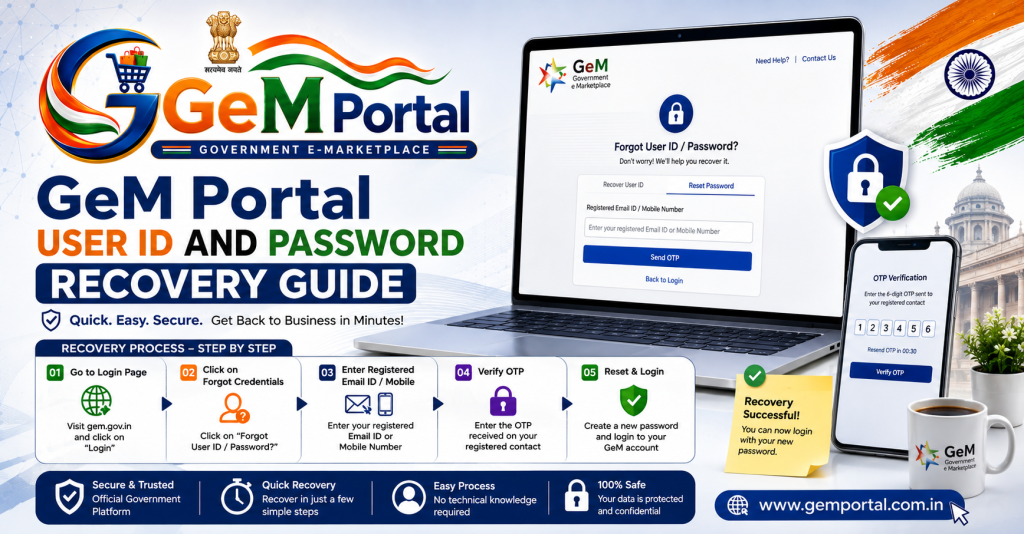
- Open the login page on gem.gov.in and choose the forgot user ID option.
- Enter the registered email address or the registered mobile number.
- Verify the OTP.
- The user ID is sent to whichever contact you used.
If neither the email nor the mobile responds, skip to the support ticket section further down, because that is now an identity problem rather than a memory problem.
Resetting a forgotten password
- Choose forgot password on the login page.
- Enter your user ID.
- Verify the OTP sent to the registered mobile or email.
- Set a new password that you have not used before.
- Update it wherever your team had stored the old one, or the next lockout arrives within a week.
Stop trying the GeM portal user ID after two failures
Repeated wrong attempts lock the account temporarily and, after enough of them, disable it. Reset rather than guess.
If the account says user disabled
This message has four usual causes, and knowing which one you have decides whether you can fix it yourself.
| Cause | Can you fix it yourself | What to do |
|---|---|---|
| Too many failed logins | Usually yes | Wait out the lock period, then reset the password |
| Profile never completed | Yes | Complete every pending profile item after login |
| Primary user left the organisation | No | Raise a primary user transfer request |
| Compliance flag on the account | No | Ticket with documents, then follow the escalation path |
Changing a registered mobile number or email
If you can still log in, this is straightforward. Open the profile section, update the contact detail, and verify the new number or address with an OTP. Aadhaar linked changes may ask for re verification.
When the registered mobile number is gone for good
This is the hard case. You cannot change the number without logging in, and you cannot log in without receiving the OTP on it. The only route is a support ticket with proof of identity and proof that the business is yours. Start it early in the week, keep the ticket number, and expect days rather than hours. Prevent the repeat by keeping the registered number on a business SIM that stays with the company, not on an employee’s personal phone.
Transferring the primary user
The account belongs to the business, but access does not move by itself when a proprietor, director or officer leaves.
- Prepare business PAN, GST certificate and an authorisation letter on your letterhead naming the new primary user.
- Raise a primary user transfer request through the official support channel.
- Complete verification for the incoming person, usually Aadhaar based.
- Once transferred, review every secondary user and remove anyone who has left.
Do not open a second account. Your PAN is already tied to the first one. A duplicate gets flagged and you end up solving two problems instead of one. The reasoning is explained in the registration rules on our registration guide.
What to prepare before raising a support ticket
- User ID, or the registered email and mobile if the ID is lost.
- The exact error message, copied word for word, with a screenshot.
- Dates and times of the failed attempts.
- Business PAN and GST certificate.
- Authorisation letter if you are not the registered person.
Raise a ticket even if you also call, because the ticket number is what lets you escalate later. The escalation ladder is set out on our GeM customer care page.
Why a GeM portal user ID gets lost in the first place
Almost every lost account traces back to one of five decisions made months earlier, and all five are avoidable.
| Decision | What it causes later | Better choice |
|---|---|---|
| Registering with an employee’s Aadhaar | Account lost when they leave | Use a proprietor, partner or director |
| Personal mobile number as registered contact | OTPs go to someone outside the business | A business SIM that stays with the firm |
| Consultant holding the password | No control when the relationship ends | You set the password on day one |
| Sharing one login across staff | Lockouts and no accountability | Secondary users with limited rights |
| Never writing the GeM portal user ID down | Recovery process every few months | Store it with your GST and PAN records |
A yearly ten minute account review
Put a reminder in the calendar and check five things once a year. Is the registered mobile number still with the business? Is the registered email still active and monitored? Is the primary user still employed? Are all secondary users people who still work here? Are the certificates on the profile current? Ten minutes prevents the week you would otherwise spend on a support ticket, and it also keeps bid options visible, since expired documents hide them quietly as our documents page explains.
What happens to your data while you are locked out
Nothing disappears. Catalogue entries, order history and past bids stay attached to the account. What does happen is quieter and more expensive: buyers place direct purchase orders elsewhere because your listings are stale, and any tender in your category closes without you. That opportunity cost is usually larger than the effort of a proper recovery, so start the process the day you notice rather than the week you have time.
Quick questions are usually covered in our GeM portal FAQ before you need a ticket at all.
Frequently asked questions
Is the GeM portal user ID the same as my email?
No. It is a separate ID you created at registration and it is case sensitive.
How do I find my GeM portal user ID?
Use the forgot user ID option with your registered email or mobile, or search your inbox for the original registration email.
How long does a temporary lock last?
A short period that gets longer each time you keep trying. Reset the password instead of retrying.
Can a consultant recover my account for me?
They can help you draft a ticket, but they should never hold your credentials. Why that matters is covered on our fees and consultants page.
Will I lose my catalogue if the account is disabled?
The data stays with the account. Once access is restored, listings are usually intact, though anything that expired while you were locked out needs updating.
Someone is asking for my OTP to fix my login. Is that normal?
No. It is the clearest sign of a scam. Read our checks on telling the real portal from a fake.